
Improve ML results with programmatic data normalization
TL;DR:
- Proper data normalization significantly enhances machine learning performance, boosting metrics such as R², accuracy, and convergence speed. It prevents dominant features from overshadowing smaller ones, ensures reproducibility, and reduces sensitivity to hyperparameter tuning. Automating and tracking normalization steps are essential for scalable, reliable, production-grade ML systems.
Skipping proper data normalization is one of the fastest ways to sabotage a machine learning project before it even reaches training. The performance gap is not subtle. Research shows normalization boosts R² from a near-useless 0.0005 to 0.804, cuts RMSE by 55%, accelerates convergence by up to 50%, and raises accuracy by 20%. Those are production-level numbers. If your pipeline treats normalization as an afterthought, you are leaving that performance on the table every single training run.
Key Takeaways
| Point | Details |
|---|---|
| Normalization boosts accuracy | Programmatic normalization can improve your model’s accuracy and convergence speed dramatically. |
| Fit scaler only on training | Always fit normalization functions on your training data to avoid data leakage. |
| Choose scaler by data type | Select MinMax, Standard, or RobustScaler based on your dataset’s distribution and outlier presence. |
| Automate for reliability | Automation and lineage tracking make normalization scalable and robust in production. |
| Handle edge cases safely | Use safe conversion functions to manage nulls, infinities, and messy data before scaling. |
Understand normalization’s impact on ML outcomes
The numbers above are striking, but they tell a deeper story. Without normalization, features with large numeric ranges dominate gradient updates, while smaller-scale features get ignored entirely. Your model does not learn the data. It learns the units. That is a structural failure, and no amount of architecture tweaking or hyperparameter searching will fully compensate.
The table below shows how key metrics shift before and after normalization in a real neural network benchmark on tabular data:
| Metric | Before normalization | After normalization | Improvement |
|---|---|---|---|
| R² (coefficient of determination) | 0.0005 | 0.804 | +160,700% |
| RMSE | Baseline | 55% lower | 55% reduction |
| Convergence speed | Baseline | Up to 50% faster | Up to 50% |
| Accuracy | Baseline | Up to 20% higher | Up to 20% |
These dramatic accuracy and RMSE improvements are not theoretical. They reflect what happens when you give gradient-based optimizers a level playing field across features.

Beyond raw metrics, there are compounding operational benefits. Faster convergence means shorter training cycles, lower compute costs, and tighter iteration loops. That matters when you are managing model refresh schedules and infrastructure budgets. Proper normalization strategies also reduce sensitivity to learning rate tuning, which simplifies the overall optimization process.
Pro Tip: Normalize your features and then re-run your baseline model before making any other changes. The performance jump alone will tell you whether your previous results were valid or just noise from unscaled data.
A well-designed data preprocessing workflow treats normalization as a fixed, automated step, not a manual checkpoint. That shift from optional to mandatory is where most mature ML teams land after enough painful post-mortem reviews.
Key materials and prerequisites for programmatic normalization
Before you write a single line of normalization code, you need the right libraries, data structures, and a clear sense of what your dataset actually contains. Rushing this step is how bugs get introduced that are nearly impossible to detect downstream.
Here are the core tools and setup requirements:
- Python libraries: scikit-learn (StandardScaler, MinMaxScaler, RobustScaler), pandas, NumPy, and optionally scipy for distribution analysis
- Dataset structure: Features clearly separated into numeric, categorical, and datetime columns before processing begins
- Null and infinity audit: Run a full scan for missing values, infinite values, and placeholder nulls (like -999) before selecting any scaler
- Categorical encoding plan: Decide upfront whether categoricals get one-hot encoded, ordinal encoded, or handled via fuzzy matching before numeric normalization runs
- Train/test split: This must be done before any scaler is fit. Fitting on the full dataset is a data leakage error, full stop
The following table compares the three most common scalers and when to use each:
| Scaler | Best use case | Sensitive to outliers? | Output range |
|---|---|---|---|
| StandardScaler | Gaussian-distributed features, linear models | Moderately | Mean 0, std 1 |
| MinMaxScaler | Bounded inputs, neural networks | Yes, strongly | 0 to 1 |
| RobustScaler | Messy real-world data with outliers | No | IQR-based |
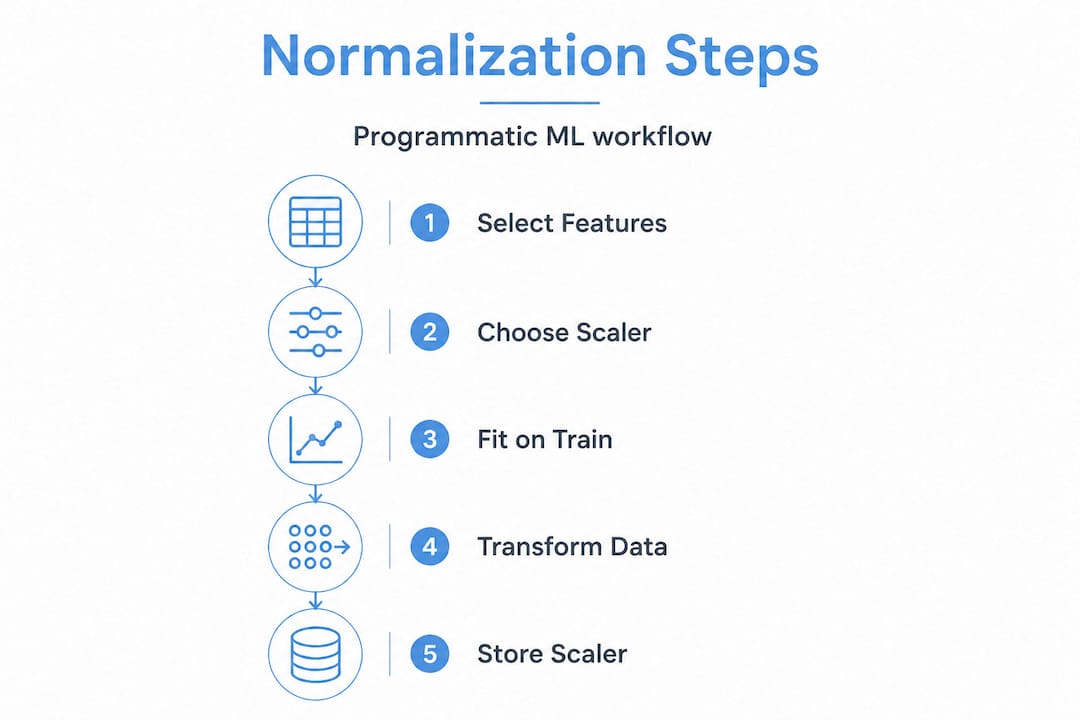
The programmatic implementation steps are well-documented: identify numeric features, choose your scaler, fit on training data only, transform both train and test, then handle all edge cases systematically.
Good data transformation practices also require you to document what transformation was applied to each feature column. This is normalization lineage, and it will save you significant debugging time when models are retrained or updated. Scale your data collection steps to account for the volume and variety of sources you will be normalizing, especially if raw inputs are coming from multiple upstream systems with inconsistent formatting.
Step-by-step programmatic normalization workflow
With your tools ready and your dataset audited, here is the exact sequence to follow for a repeatable, production-grade normalization pipeline.
-
Identify numeric columns programmatically. Use pandas "select_dtypes(include=‘number’)` to isolate all numeric columns. Do not rely on manual lists, which break when schemas change.
-
Run a distribution check. Use histograms or a skewness metric to understand the shape of each feature. This directly informs which scaler you choose in the next step.
-
Select the right scaler for each feature. Apply MinMaxScaler for bounded neural network inputs. Use StandardScaler for features with roughly Gaussian distributions. For any feature with outliers or messy real-world data, RobustScaler outperforms MinMaxScaler significantly because it uses the interquartile range instead of min/max, so extreme values do not distort the scaled output.
-
Fit the scaler on training data only. This is non-negotiable. Fit on training data, transform both train and test sets using those training statistics. Any other approach leaks future information into your training process.
-
Apply safe conversion functions before scaling. For numeric fields that contain currency symbols, commas, or mixed types, write a
safe_number()function that strips formatting and returns a clean float or a defined default value on failure. Never let a malformed string silently become NaN and propagate through your pipeline. -
Handle nulls and infinities explicitly. After safe conversion, run a second pass to replace any remaining NaN or infinite values with column medians or defined constants. Do not let the scaler encounter them.
-
Apply fuzzy matching for categorical features with inconsistent labels. Strings like “New York,” “new york,” and “NY” represent the same value. A LookupNormalizer with fuzzy matching resolves these before encoding and prevents spurious new categories from appearing in production data.
-
Truncate long strings on text fields. For any string feature feeding into downstream encoding, apply a
safe_string()function that caps length at a defined maximum. Long strings can break vectorizers and slow processing significantly.
“The difference between a pipeline that works in development and one that works in production is almost always in how edge cases are handled, not in the core logic.”
Pro Tip: Store your fitted scaler objects using joblib or pickle alongside your trained model artifacts. When you serve predictions, you must apply the exact same scaling parameters used during training. Recomputing them on new data is one of the most common production bugs in ML systems.
Review your dataset cleansing steps and cross-reference them against your normalization workflow to make sure cleaning and scaling happen in the right order. Also consult a solid ML dataset quality guide to validate that your input data meets the baseline requirements before normalization even begins.
Troubleshooting, edge cases, and common mistakes in normalization
Even well-designed pipelines fail in production. Here is where most teams run into problems and how to address each one systematically.
- Fitting the scaler on the full dataset: This leaks test set statistics into training. Always split first, then fit.
- Ignoring new categories at inference time: If a feature value in production was never seen during training, your encoder will fail. Build in a default fallback behavior.
- Assuming all numeric columns need the same scaler: Different distributions require different treatment. A single scaler applied uniformly across all features is almost always the wrong call.
- Missing incremental update logic: Batch normalization works for static datasets. But if your training data grows over time, you need incremental processing support so new data batches get normalized against the original training statistics, not recomputed from scratch.
- No graceful degradation: If a normalization step fails on a single column, your entire pipeline should not crash. Build fallback defaults so the pipeline continues with a warning, not a fatal error.
“Lineage tracking means you know exactly what transformation was applied to every column, when, and with what parameters. Without it, debugging a model drift issue becomes archaeology.”
Tracking normalization lineage is especially important when models are retrained periodically. Without a record of which scaler was fitted on which data snapshot, reproducing a model’s exact training conditions becomes nearly impossible. Check your data pipeline checklist to confirm you have lineage logging built into every normalization step.
Pro Tip: Log the mean, standard deviation, min, max, and scaler type for every feature column as part of your model metadata. This makes auditing and rollback straightforward when something goes wrong in production.
Why rigid manual normalization fails—and how automation unlocked scale
Manual normalization workflows are fragile by nature. A data scientist writes a script, it works on that week’s export, and then the schema changes slightly three months later. Suddenly the pipeline is producing silently wrong results, and no one catches it until a model evaluation flags unexpected drift.
We have seen this pattern repeatedly across large-scale data projects. The fix is not better documentation or more careful humans. The fix is automation that is robust enough to handle variation without breaking, combined with lineage tracking that makes every transformation auditable.
The best production pipelines treat normalization as an automated, versioned artifact of the model build process, not a manual preprocessing script someone runs before training. Production-grade best practices including graceful degradation, fuzzy matching, lineage tracking, and incremental processing are not optional for teams operating at scale. They are the minimum viable standard.
The strategic lesson is this: invest in normalization automation early, before your model inventory grows. The cost of retrofitting a robust normalization layer across 50 models is five to ten times the cost of building it right on model number one. Data pipeline fundamentals always pay forward.
Streamline normalization efforts with Dot Data Labs
Building and maintaining a robust programmatic normalization pipeline takes time, tooling, and continuous iteration. Many ML teams get the core logic right but struggle with edge case handling, lineage tracking, and keeping pipelines reliable as data sources evolve.

DOT Data Labs delivers high-quality data for training AI that arrives normalization-ready, cleaned, and validated against production standards. Whether you need a one-off custom dataset scoped to your exact feature requirements or an ongoing data pipeline that continuously feeds structured, labeled data into your training infrastructure, we handle the full data supply chain. Explore our approach to AI-driven model training and review the training-ready data criteria we apply to every project to see exactly what production-ready looks like in practice.
Frequently asked questions
What’s the best scaler for neural networks?
MinMaxScaler works well for bounded neural network inputs, but it is highly sensitive to outliers. RobustScaler is the better choice when your training data is messy or skewed.
Should you fit the scaler on both train and test data?
No. Always fit on training data only, then apply that fitted scaler to transform both training and test sets. Fitting on both sets constitutes data leakage.
How do you safely normalize data with nulls or infinities?
Use safe conversion functions that strip irregular formats, handle currency symbols, replace infinities, and return defined defaults on failure before any scaler is applied.
Can normalization improve model convergence speed?
Yes. Research shows normalization improves convergence by up to 50% and can raise model accuracy by as much as 20% on tabular datasets.